
AllianceHCM MyPay
Alliance Payroll Services, LLCBusiness
4.0382.00 Reviews
- Version
- 3.4.59
- Installs
- 500.00K
- Age Rating
- Everyone
Screenshots
Our Review of AllianceHCM MyPay
 Analysis by Appyee
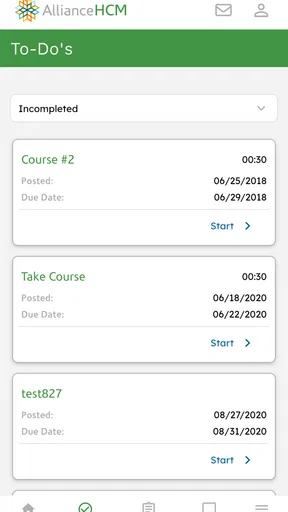
Managing pay and workplace information from a phone sounds simple until you need one specific document at the right moment. I tested AllianceHCM MyPay as a practical employee portal rather than treating it like a full business-management suite, and that distinction matters. Its job is to give employees a mobile route into payroll and HR tasks connected to Alliance Payroll Services, LLC. If your employer already uses that system, the app can make routine checks much less dependent on a desktop browser.
My overall impression is that this is a focused business app for access and convenience, not a tool I would choose to run payroll, manage a team, or replace an employer’s wider HR platform. That focus is both its main strength and its main limitation. The right buying decision depends less on the app’s download count or rating than on whether your workplace is already set up to support it and whether your everyday needs are mainly employee self-service.
What I would check before choosing a payroll portal
The first question is not whether the interface looks appealing. It is whether your employer uses Alliance Payroll Services, LLC and has enabled the employee portal for you. An employee-facing app cannot create payroll access by itself. If your workplace uses another provider, this app is unlikely to be useful no matter how well it fits your preferred workflow.
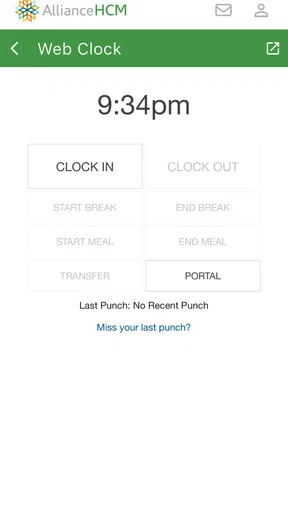
I would also think about the tasks you actually perform. Someone who checks pay information occasionally, needs HR records while away from a computer, or wants a convenient mobile entry point has a clear reason to try it. Someone looking for employee scheduling, recruiting, accounting, time tracking, or employer-level payroll administration should be more cautious. The store summary positions it around payroll and HR management, but that should be understood from the employee side rather than as a promise of every HR function in one place.
Device compatibility is another sensible checkpoint. The app supports Android 7.0 and later, which covers many older devices, although an older phone may still feel slower or less comfortable than a newer one. It is free to install, and its Everyone age rating makes it broadly accessible. Those points remove two common barriers, but they do not remove the need for an employer account and working credentials.
Its public reception gives me moderate confidence rather than a reason to install blindly. The app holds a 4.0 average from around 1.1 thousand ratings, with roughly 382 written reviews and over 500 thousand installs. I read those figures as evidence that it is an established employee tool, not proof that every organization’s setup will be equally smooth. Payroll portals often depend on employer configuration, account status, and the quality of the underlying service.
The everyday situation where it makes sense
Imagine being away from your usual desk and needing to check a recent pay statement before answering a landlord, lender, or personal budgeting question. With a conventional desktop-only portal, I would wait until I had a computer, remember the password, and navigate through a browser. A dedicated mobile entry point is more convenient for that kind of small but time-sensitive task. The same logic applies when an employee wants to review HR information during a commute, on a break, or while traveling for work.
I would not install it merely because an employer mentions a mobile payroll option. I would first ask whether I regularly need those records away from a computer. If the answer is no, a browser bookmark may be enough. If I frequently need quick access, the app becomes more worthwhile because it puts the employee portal in the same place as other daily tools.
Where AllianceHCM MyPay is most useful
The strongest part of the experience is its narrow purpose. Instead of asking employees to understand a large collection of business controls, it presents itself as a route to payroll and HR information. That can reduce friction for people who do not want to learn a complicated administrative system. I found the concept easier to understand than a general business app that mixes employee tasks with manager and payroll-admin functions.
For an employee, the value is not necessarily doing something dramatic. It is reducing the number of steps between a question and the relevant workplace record. When I want to confirm a payroll detail, I prefer a direct employee portal over searching through email attachments or asking a manager to retrieve information. That convenience can also make personal record keeping more regular, because checking information becomes a quick phone task instead of a chore reserved for a desktop session.
Another useful angle is separation of responsibilities. A payroll and HR portal is more appropriate for personal employment information than a general messaging app or a shared workplace drive. I would rather use a dedicated employee channel than rely on screenshots, forwarded documents, or informal requests. The app’s role is therefore practical: it encourages employees to look in the designated system first.
Small workflow improvements that are easy to overlook
One helpful habit is to use the app as a verification step after a pay cycle rather than only opening it when something seems wrong. A quick review can help me notice an unexpected change earlier, while the details are still fresh. I would record important documents in my own secure filing system when appropriate, instead of assuming that a mobile portal should be my only long-term archive.
A second tip is to treat access problems as two separate issues. If the app opens but the employee account does not work, the problem may involve employer setup or credentials rather than the installation itself. Reinstalling repeatedly is not a useful first response. I would check the organization’s instructions, confirm that I am using the correct account, and then contact the employer’s designated payroll or HR support route.
A third practical use is preparing before travel. If I expect to need employment records while away, I would sign in at home, confirm that the account works, and understand where the relevant information is located. That is more reliable than discovering during a trip that I have forgotten a password or that my account needs activation. The app is most valuable when it removes an avoidable delay, and preparation is what makes that benefit real.
There is also a useful boundary here: I would avoid treating a phone screen as the best place for every payroll task. Reviewing a record is comfortable on mobile; comparing several documents, entering extensive information, or investigating a complicated discrepancy may still be easier on a larger screen. The app can improve access without making desktop work obsolete.
Who should consider installing it
I would recommend trying it to employees whose company specifically directs them to AllianceHCM MyPay for payroll or HR access. It is particularly suitable for people who work away from a fixed desk, move between locations, or prefer handling short administrative tasks on a phone. Employees who want a straightforward portal rather than a broad collection of workplace tools are also a good match.
It may be useful for a small business employee who does not have a dedicated HR office nearby. In that situation, the portal can become a central place to begin when a question concerns personal payroll information. It does not replace a conversation with HR when an issue needs correction, but it can help the employee identify what needs to be clarified before making contact.
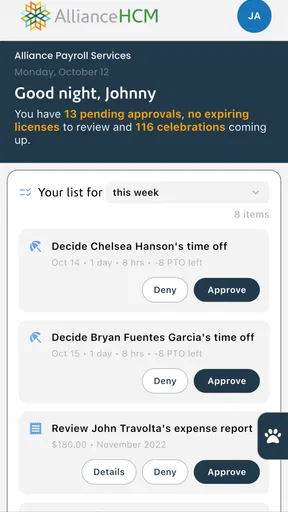
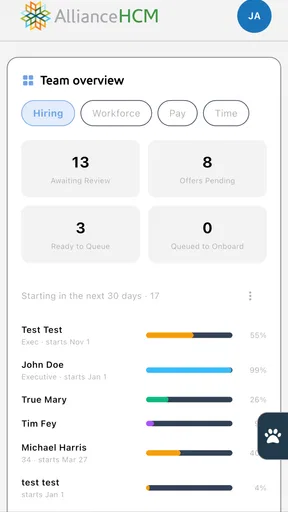
I would be less enthusiastic for someone who expects the app to manage a whole organization. Employers and managers looking for advanced payroll administration, workforce planning, hiring workflows, or detailed reporting should evaluate the broader Alliance service and its administrative tools rather than judging everything by this employee app. The mobile portal is not the same thing as a complete business operating system.
Where a different option may fit better
The usual alternative is the employer’s web portal accessed through a mobile browser. A browser can be preferable when I use several workplace systems, need a larger layout, or do not want another installed app. It also avoids the question of whether a particular mobile app remains convenient after an employer changes its internal process. The trade-off is that a browser session may feel less direct, especially when I only need to check one item.
Email is another common alternative, but I see it as a weaker long-term method for sensitive employment records. Email can be useful for notifications and communication, yet it is not an ideal replacement for returning to the official employee portal. Messages can become difficult to find, attachments can be scattered across accounts, and forwarding information creates unnecessary confusion about which version is current.
A general HR or payroll app from another provider may be a better fit for someone who wants several workplace functions in one ecosystem. However, switching to a different app is not normally an individual employee decision when the employer has selected the payroll provider. In that situation, the relevant comparison is usually between the AllianceHCM mobile route and the employer’s existing browser or support process, not between apps chosen freely from an app store.
For employees who rarely use mobile tools, a desktop workflow may remain better. A larger screen is more comfortable for reading detailed records, printing, saving files, or comparing information across periods. I would not force a phone-based workflow on someone who already has quick, reliable computer access. Convenience only counts when it matches the way a person actually works.
Limitations I would keep in mind
The app’s usefulness is dependent on the employer relationship. That is the central limitation, and it is more important than any visual preference. Installation alone does not guarantee access, and an employee cannot solve every account issue from the app. If the organization has not enabled the portal or if records are incomplete, the mobile interface cannot compensate for that.
I also would not assume that a dedicated app automatically makes complicated HR matters simple. A payroll discrepancy, benefits question, or employment-record correction may require context that a self-service screen cannot provide. The app can help me inspect information and prepare a clearer question, but I would still use the employer’s official support channel for disputes or corrections.
There is a privacy trade-off with any payroll app on a personal phone. I would use a device lock, avoid signing in on a shared phone, and be careful when reviewing employment information in public. These are sensible habits rather than special claims about this particular product. The important point is that mobile convenience increases access, so I need to take responsibility for who can access the device.
Finally, the current version is 3.4.59, while the app has been available since January 15, 2018. That history suggests an established product rather than a brand-new experiment, but longevity alone does not tell me how well it will match a specific employer’s current setup. I would keep the app updated through the normal store process and judge it by whether it reliably supports the tasks my workplace assigns to it.
What switching to it actually involves
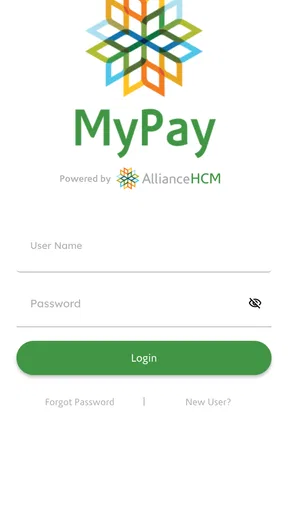
Moving from a browser habit to a mobile app is not a major technical migration, but it does involve a change in routine. I would install the free app, follow the employer’s sign-in or activation instructions, and test access before relying on it for an urgent document. I would also decide whether I want notifications, if the organization’s setup offers them, based on how often I need reminders rather than enabling every alert automatically.
The bigger cost is behavioral. If I have always searched email for payroll records, I need to learn where the official information lives and make the portal my first stop. That is worthwhile when I check records regularly, but unnecessary when the app would sit unused. I would not delete existing documents immediately; I would first confirm that the new workflow gives me dependable access to the records I care about.
For an employer, the change is more involved because employees need clear instructions and a support path. A rollout works better when staff know which credentials to use, whom to contact when activation fails, and whether the mobile app is intended as a supplement or the primary access method. The app itself cannot communicate those workplace decisions unless the organization does so clearly.
That is why I see the installation decision as low risk but the reliance decision as more serious. Trying the app costs nothing, yet depending on it for an important deadline deserves a test run. I would sign in, locate a familiar payroll or HR item, and make sure I understand the route back to support before assuming everything is settled.
My recommendation for employees deciding today
I recommend AllianceHCM MyPay when your employer uses Alliance Payroll Services, LLC and you want a convenient mobile doorway to your employee payroll and HR information. Its free price, broad Everyone rating, support for Android 7.0 and later, and established presence make it easy to try. The 4.0 average from around 1.1 thousand ratings is encouraging, but I would still treat employer setup as the deciding factor.
I would choose it over relying on scattered email messages when I need regular, direct access to employment records. I would choose a browser instead when I prefer larger-screen work, rarely use mobile administration, or already have a smooth desktop routine. I would look for a broader administrative solution when my needs involve managing other employees or operating payroll rather than viewing my own information.
The clearest decision rule is simple: install it if Alliance is your employer’s portal and mobile access solves a real problem in your week. Before depending on it, confirm that your account works and keep the employer’s support route available for anything the app cannot resolve. Used with those expectations, it is a sensible employee tool: focused, convenient, and more useful for everyday access than for ambitious all-in-one HR management.
For my own recommendation, I would give it a try rather than treating it as an automatic replacement for every payroll workflow. It earns its place when it saves a trip to a computer or makes an important record easier to reach. If that is exactly what you need, AllianceHCM MyPay is a practical choice; if not, the familiar web portal may remain the cleaner option.
Verdict
Strengths of AllianceHCM MyPay
- Quick access to pay statements and earnings history
- Secure employee login helps protect sensitive payroll information
- Useful for checking tax withholdings and deductions
- Mobile access makes payroll details available away from work
- Clear summaries can simplify reviewing compensation changes
Limitations of AllianceHCM MyPay
- Requires employer participation in the AllianceHCM platform
- Some features may be unavailable depending on company settings
- Login or account issues may require help from your HR department
- Payroll updates can depend on when the employer uploads new data
- Sensitive financial information requires extra care on shared devices
Similar Picks in This Category
View All
LinkedIn: Community & Network
LinkedIn3.8

Zoom Workplace
zoom.com4.1

Microsoft Teams
Microsoft Corporation4.6

Meta Business Suite
Meta Platforms, Inc.4.6

Webex Meetings
Cisco Systems, Inc.4.5

TeamViewer Remote Control
TeamViewer4.4
Frequently Asked Questions
What is AllianceHCM MyPay used for?
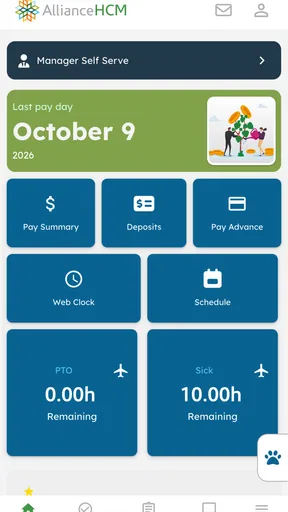
AllianceHCM MyPay is designed to give employees convenient access to payroll and personal employment information from a mobile device. Depending on the features enabled by the employer, you may be able to view pay statements, earnings details, deductions, tax information, direct-deposit data, time records, benefits, and company announcements. The exact tools available can vary between organizations.
How do I log in to AllianceHCM MyPay?
To use AllianceHCM MyPay, you generally need an account provided or activated by your employer. Sign-in may require an employee ID, username, password, company code, or another organization-specific credential. If you have not received access details, cannot remember your password, or your account is locked, contact your human resources or payroll department rather than creating a separate personal account.
Can I view my pay stubs and tax documents in the app?
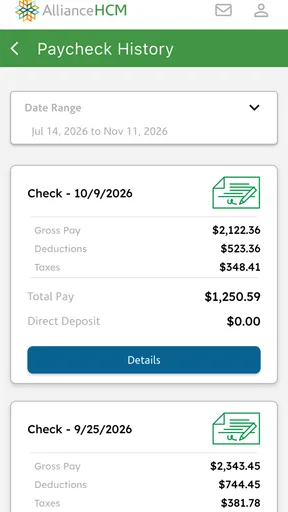
In many organizations, AllianceHCM MyPay allows employees to review current and previous pay statements, including gross pay, taxes, deductions, and net pay. Some employers may also publish year-end tax forms or other payroll documents through the platform. Availability depends on your company’s configuration, so certain records may only be accessible through the web portal or directly from payroll.
Is AllianceHCM MyPay secure for accessing payroll information?
Because the app may contain sensitive salary, tax, banking, and employment information, users should treat it as a private financial service. Use the official app or employer-provided access link, keep your password confidential, enable device security, and avoid signing in on shared or public devices. Always install updates from an official store and contact your employer if suspicious activity appears.
What should I do if my information is missing or incorrect?
AllianceHCM MyPay normally displays information supplied by your employer’s payroll or human resources system, so the app may not be able to correct records directly. If a pay statement, tax document, schedule, deduction, or personal detail looks wrong or is unavailable, first refresh the account and check for updates. If the issue remains, contact your organization’s payroll or HR support team.
